Padel in Seaforth - Court Hire, Coaching & Matchplay

Court Hire, Social Matchplays, Free Intro Classes, Coaching and more – Available Now

New to padel? Book a free introductory class

An easy way to try the sport and get started.

Book a Court or Join Open Match

Get your crew together and book a private court, or join an Open Match and connect with other players. Play padel your way!

Voyager Seaforth Padel Court Hire and Coaching Programs
3 Courts
7 Days Open
7am–9:30pm Hours
Voyager Seaforth Free 30-Minute Intro to Padel Class led by Tim Walter

New to Padel?

Come and discover what all the excitement is about, completely FREE!

For one week only, we're offering special introductory classes designed to help you learn the basics and experience the fun of padel firsthand.

FREE 30-MINUTE INTRO TO PADEL CLASS

Monday 2 – Saturday 7 November 2026

Led by Voyager's Sumit Rana, Tim Walter and Ryan Henry, these beginner-friendly sessions will introduce you to the game, teach you the fundamentals and get you rallying in no time.

No experience required. All equipment provided.

Join Matchplay Competitions

Get ready for 90 minutes of exciting, level-based matchplay! Put your skills to the test, meet fellow padel players and enjoy competitive games matched to your ability.

Our player rating system helps ensure you're playing with others at a similar level.

RatingLevel
0-2.0 Beginner
2.0-3.5 Intermediate
3.5-5 Strong Intermediate
5+ Advanced

Please book based on the level you can perform consistently — not your best day.

Matchplay Competitions at Voyager Seaforth

Join a social competition – $15, normally $20

Enjoy 90 minutes of competition play without needing to organise your own group.

Offer until 31 Oct only

Voyager Padel App
Book, play, repeat!

It’s better with the Voyager Padel App

Book courts, join Open Matches and manage your padel bookings with ease, anytime, anywhere.

Download the Voyager Padel App and get ready to play!

Get Started with the Voyager Padel App

Watch our step-by-step video guide to learn how to get started and make the most of the app.

Voyager Seaforth Padel Voyager Seaforth Padel Voyager Seaforth Padel Voyager Seaforth Padel Voyager Seaforth Padel Voyager Seaforth Padel

Voyager Seaforth Padel

NOW OPEN

Book your court online today

Book a Court

Meet Your Seaforth Team

High-quality coaching delivered by our team of qualified coaching professionals.

Nick Nguyen

Assistant Head Coach & Lead Pickleball Coach

Have your own group? Book a court

Get your friends together and play at a time that suits you.

Social Adult Doubles Matchplay

Fun social games of pickleball doubles where players will get plenty of games. No partner required — just show up and play.

  • No partner required
  • All levels welcome
  • Plenty of game time
Coming Soon

Social Adult Doubles Matchplay

Our Social Adult Doubles Matchplay sessions will be available soon. Stay tuned for updates!

League Competitions

Enter a weekly comp with a partner (or we'll find you one) and compete against teams in your division. League ladder updated weekly with an end-of-term finals night.

  • Partner provided if needed
  • Weekly ladder updates
  • End-of-term finals night
Coming Soon

League Competitions

Our League Competitions are currently being prepared and will be available soon. Stay tuned for updates!

How to Register for
the Padel Programs

4 simple steps to get on court.

Step 1
Download the App

You need the Voyager Tennis App to register for the programs. Using iOS or Android? Download for your device below. Once downloaded, register using your email and create a password.

Step 2
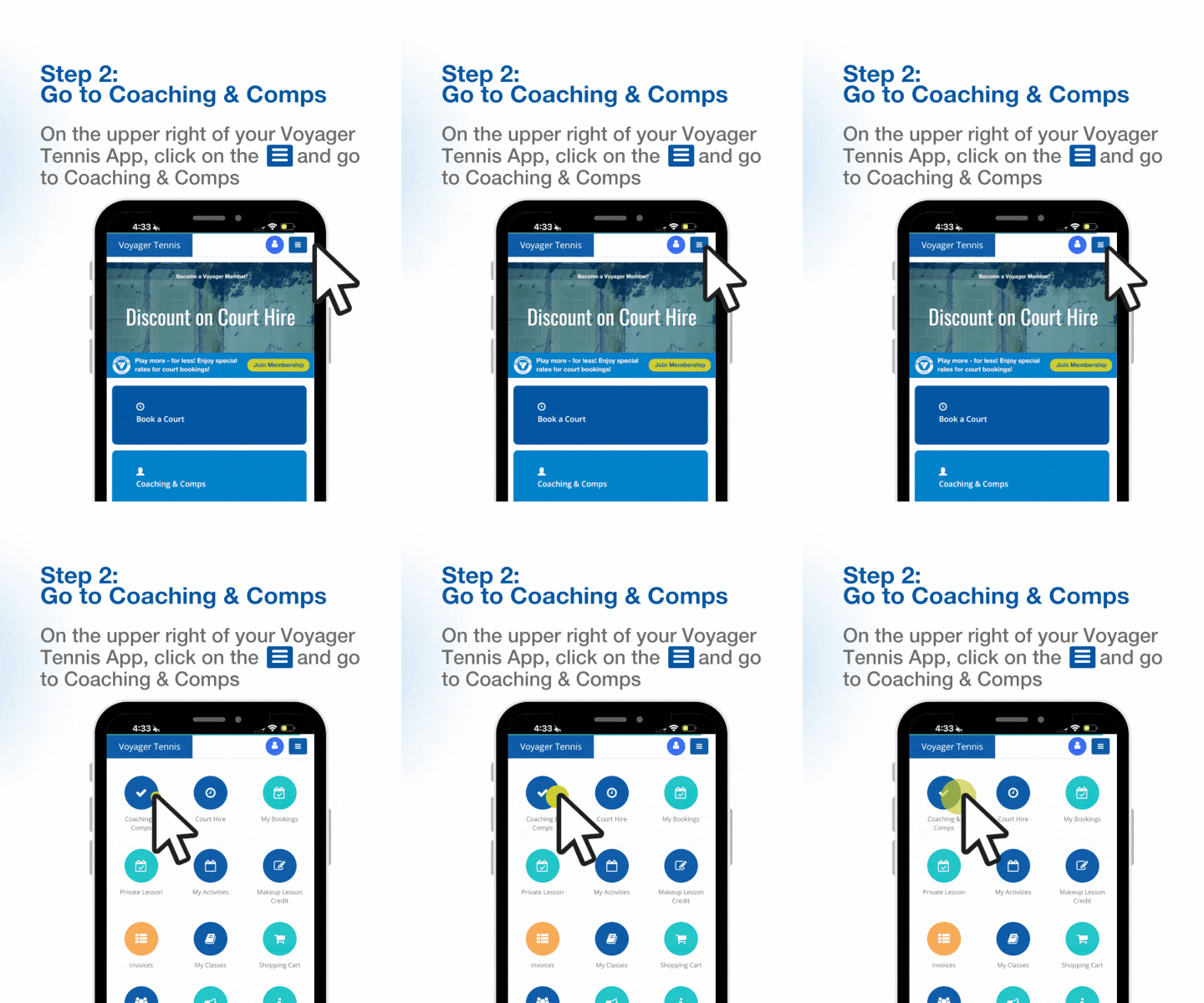
Go to Coaching & Comps

On the upper right of your Voyager Tennis App, tap the menu icon ☰ and go to Coaching & Comps.

Step 2 - Coaching and Comps
Step 3
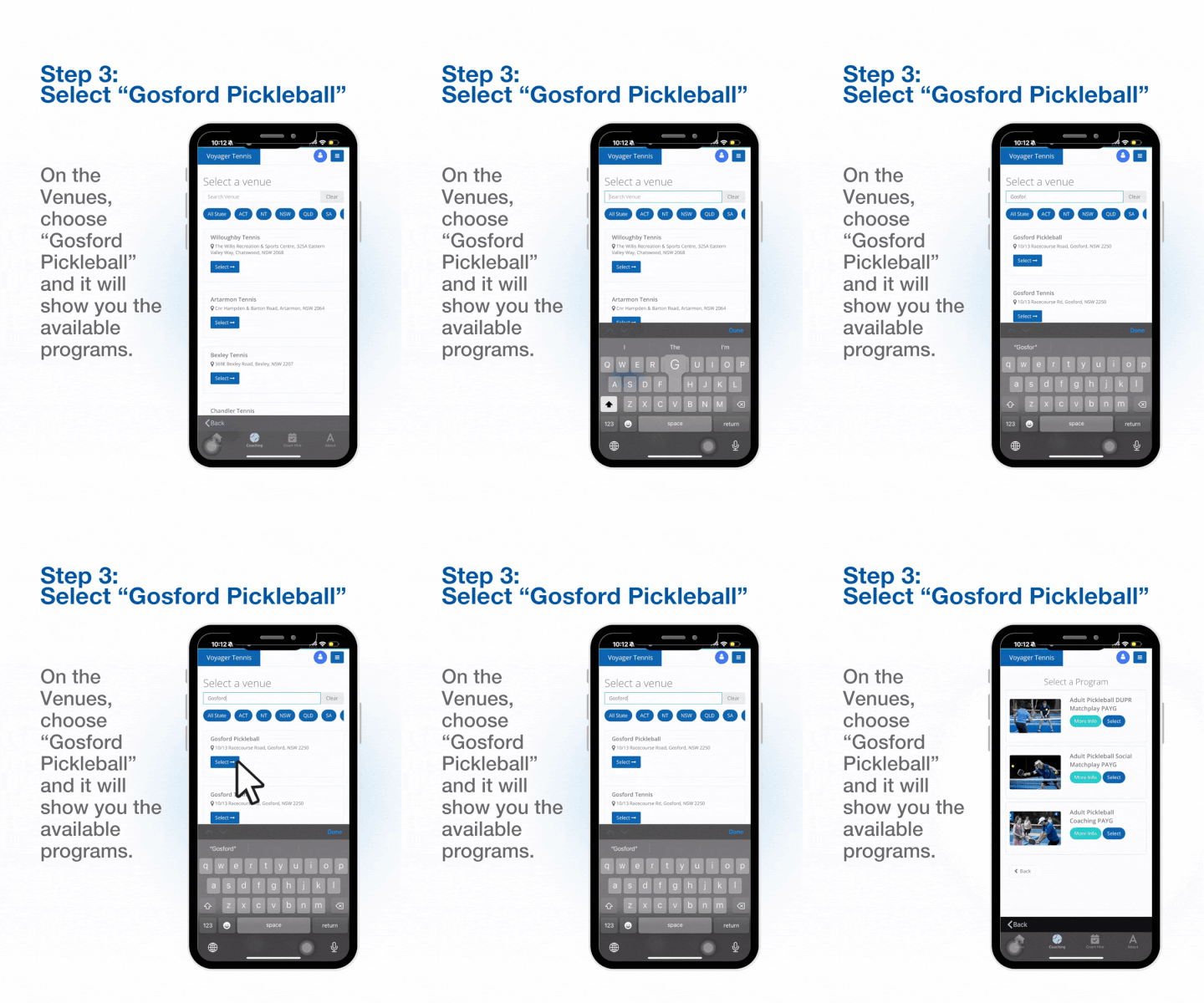
Select "Seaforth Padel"

On the Venues screen, choose "Seaforth Padel" and it will show you all the available programs.

Step 3 - Select Seaforth Padel
Step 4
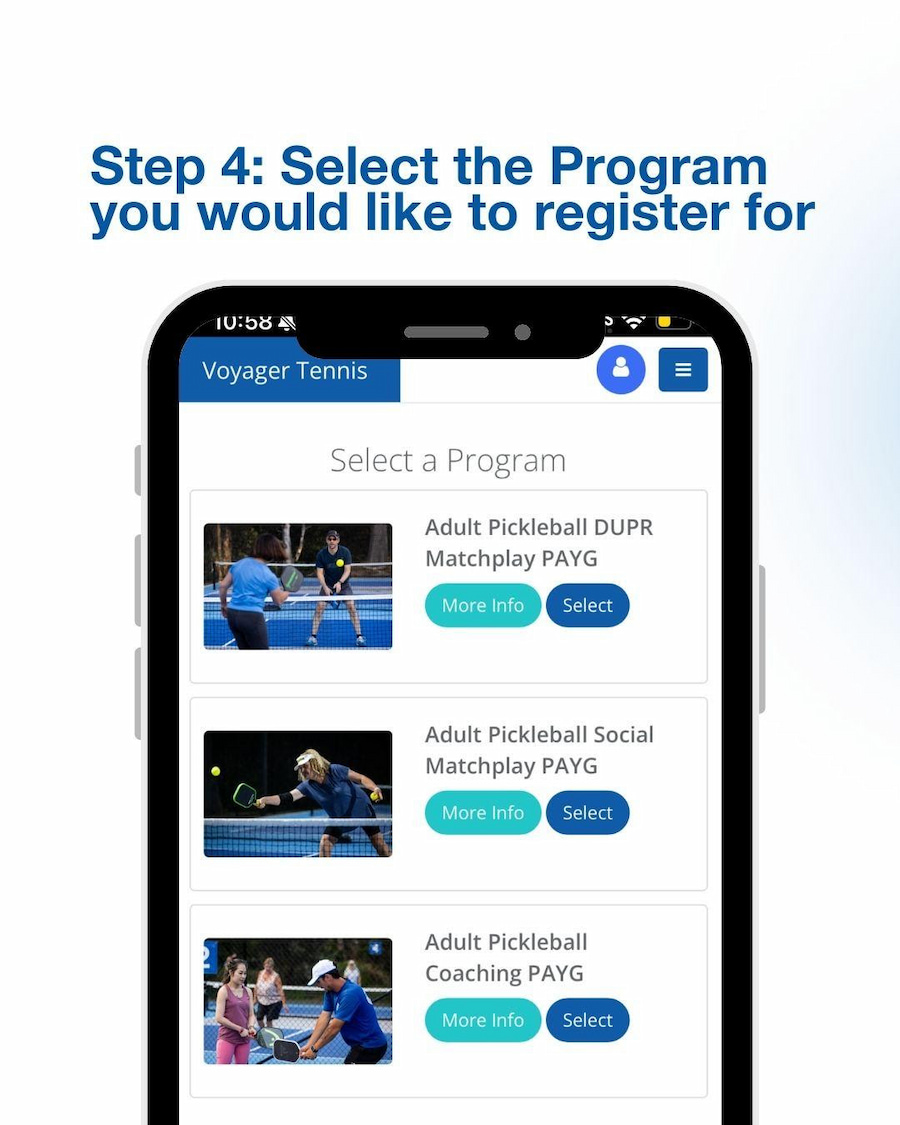
Select the Program

Choose the program you'd like to register for and complete your booking. That's it — see you on court!

Step 4 - Select Program